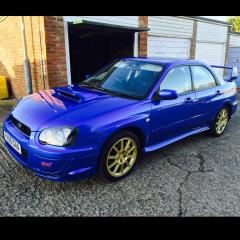
March 23, 201511 yr A very clean and not abused Impreza, 2 previous owners, full and comprehensive service history, cambelt and all the pulleys just changed, just serviced, the only modification done to the car is a Hayward and Scott exhaust, STI rear lights, spoiler and dump valve, 107000 miles, always kept in the garage, I have owned the car for the last 6 years and it has never let me down, comes with an extra set of alloys, original lights and spoiler, MOT until July. Car located in Hertfordshire. £2700
March 23, 201511 yr Nice and tidy looking car. Did you have a price? It might help with the sale. Good luck!
March 23, 201511 yr I've noticed the prices vary wildly. All depends on service history and the buyer. It's only worth what someone wants to pay. But from the pics its a real tidy looking car.
March 23, 201511 yr Contact RichR I believe he is still on the lookout - although I believe he did want a WRX buuuut you never know as it is a really clean example http://uk.subaruownersclub.com/forums/topic/12841-looking-for-wrx/
March 23, 201511 yr Very nice looking car A couple of days earlier and i would of had it I collected a WR Sport on Saturday I cant see you having a problem selling her I would try ebay with a fixed price that way you might keep the idiots at bay or maybe preloved i sold a couple of cars on there again less idiots more genuine buyers Rich



Create an account or sign in to comment