Do Not Sell My Personal Information Jump to content
View in the app

A better way to browse. Learn more.

Subaru Owners Club UK | Subaru Forums

A full-screen app on your home screen with push notifications, badges and more.

To install this app on iOS and iPadOS
  1. Tap the Share icon in Safari
  2. Scroll the menu and tap Add to Home Screen.
  3. Tap Add in the top-right corner.
To install this app on Android
  1. Tap the 3-dot menu (⋮) in the top-right corner of the browser.
  2. Tap Add to Home screen or Install app.
  3. Confirm by tapping Install.

Featured Replies

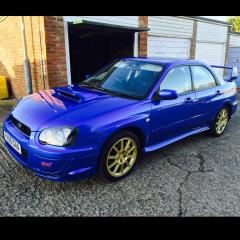
Finally found a low mileage (58000) standard WRX STI Wide Track, will add more pic's soon. 

FullSizeRender.jpg


does look rather spanking :yahoo:


Tidy, [emoji3][emoji106].

Widetrack [emoji3]

Very nice. And your not that far from me in W/x.

That's a beautiful car my friend. 


  • Author
9 hours ago, GeoffLeggy said:

Spot on that is! Does it fit in the garage??

It sertanly does, my garage is quite big inside, you can fully open doors on both sides to get out 

  • 1 month later...
  • Author

Finally got a chance to take some more pics. Put on some scooby world mud flaps and had the wheels powder coated. Got new suspension coming tomorrow to fit over the weekend. 

image.jpeg

image.jpeg

image.jpeg

image.jpeg

image.jpeg

image.jpeg

image.jpeg

  • Author
1 hour ago, GeoffLeggy said:

Very very nice :thumbs_up: 

Thanks 

Create an account or sign in to comment


Background Picker
Customize Layout

Configure browser push notifications

Chrome (Android)
  1. Tap the lock icon next to the address bar.
  2. Tap Permissions → Notifications.
  3. Adjust your preference.
Chrome (Desktop)
  1. Click the padlock icon in the address bar.
  2. Select Site settings.
  3. Find Notifications and adjust your preference.