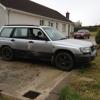
February 23, 201313 yr Hello I recently bought a 1998 Forester 2.0, it was quite cheap at only £220 from a friend. It seems to be quite good for what it cost electric windows, heated seats even working air con, although at the price there are some issues, there is a petrol leak, a busted drivers side lock (someone has tried to break in at some point) and there is 209,000 miles on it but the car has a very good service history tonnes of receipts and it seems to have been well looked after. I bought this to replace my suzuki samurai which i sold a few months back, i wanted to replace it with something with 4x4 but that would not roll over so easily. Here is a picture of it: It seems a bit lower than normal, i was told its had the suspension from an STI put in it, i was wondering what is the ground clearance of a normal forester, is it common to put lift kits into them?
February 24, 201313 yr Nice look's like a good buy to me. And even with that amount of miles it could still go another 100K mile's Not sure what the clearance is on one sorry. Maybe a Forester owner on here will let you know :D
February 24, 201313 yr that sounds like a great deal, particularly with the extensive history, if you put standard springs back on instead of the STI ones that should improve the ride height but at the cost of handling.



Create an account or sign in to comment