Do Not Sell My Personal Information Jump to content
View in the app

A better way to browse. Learn more.

Subaru Owners Club UK | Subaru Forums

A full-screen app on your home screen with push notifications, badges and more.

To install this app on iOS and iPadOS
  1. Tap the Share icon in Safari
  2. Scroll the menu and tap Add to Home Screen.
  3. Tap Add in the top-right corner.
To install this app on Android
  1. Tap the 3-dot menu (⋮) in the top-right corner of the browser.
  2. Tap Add to Home screen or Install app.
  3. Confirm by tapping Install.

New Member, First Subaru

Featured Replies

Hi people, 

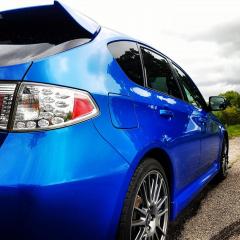
Thought I'd drop a post as been reading a lot on here and just got myself a 2010 wrxsIMG_20160702_230654.jpg.  Love the car and got a few bits in mind for her. Anyone any must do recommendations? 20160708_141028.jpg

IMG_20160702_192026.jpg


Hello & welcome she looks tip top.

salsaking, scoobypete or Jay are the best people to advise on hatch stuff

Sent from my SM-G930F using Tapatalk

  • Author

Thanks stants.  Will be sure to look at some of their stuff. Be good to here off other hatch owners too. 

Welcome to the the club thats a cracking looking motor you've got yourself there, lovely colour 


Create an account or sign in to comment


Background Picker
Customize Layout

Account

Navigation

Search

Configure browser push notifications

Chrome (Android)
  1. Tap the lock icon next to the address bar.
  2. Tap Permissions → Notifications.
  3. Adjust your preference.
Chrome (Desktop)
  1. Click the padlock icon in the address bar.
  2. Select Site settings.
  3. Find Notifications and adjust your preference.