Do Not Sell My Personal Information Jump to content
View in the app

A better way to browse. Learn more.

Subaru Owners Club UK | Subaru Forums

A full-screen app on your home screen with push notifications, badges and more.

To install this app on iOS and iPadOS
  1. Tap the Share icon in Safari
  2. Scroll the menu and tap Add to Home Screen.
  3. Tap Add in the top-right corner.
To install this app on Android
  1. Tap the 3-dot menu (⋮) in the top-right corner of the browser.
  2. Tap Add to Home screen or Install app.
  3. Confirm by tapping Install.

New

Featured Replies

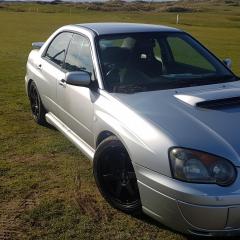
New here with my blobeye wrx I've had for over a year. It's my first subaru and looking for some bits if any knew has any. I'm near greenock 

IMG_20161112_132105.jpg


  • Author

Cheers, will do

Hi mate, quite similar to mine - seems lower? Whats the mod list?

Sent from my iPhone using Tapatalk

Welcome mate ive got some lovely carbon fiber fog ducts that would suit that 😉

  • Author

At the moment just BC coilovers need to finish the suspension nd get it set for fast road

Hows the ride with this bc setup?

___

.--. [WRX]

.----' '--. |

'-()-----()-' |


  • Author

Decent and firm but a bit to low at the moment.

Create an account or sign in to comment

Background Picker
Customize Layout

Account

Navigation

Search

Configure browser push notifications

Chrome (Android)
  1. Tap the lock icon next to the address bar.
  2. Tap Permissions → Notifications.
  3. Adjust your preference.
Chrome (Desktop)
  1. Click the padlock icon in the address bar.
  2. Select Site settings.
  3. Find Notifications and adjust your preference.