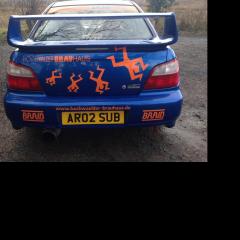
March 9, 20178 yr Hi all. Just joined even though I sold my 2002 Sti over a year ago. A neighbour told me he'd seen it for sale again and I want to try to track it down. He can't remember where he saw it and I only sold it as I had a new UK first edition right hand drive Ford Mustang just about to arrive. I didn't think I could justify keeping my Scooby but I ended up buying an F1 R26 as my daily driver anyway so may as well have kept it!! It was unique with Orange "Hochwalder Brauhaus" decals and "Bubba Gump" stickers are the front. I loved that car!! I sold it to someone from the Midlands who drove down to me in Suffolk to collect it I have seen a message on here from a member saying he saw it at Hurst Motors last March can anyone help?
March 9, 20178 yr Author It was unique!! Had great mods and it flew!! Had 2 middle aged previous owners so I know it was well cared for. Previous owner rarely took it over 3000 rpm (bit of a waste) but great for me buying it off him. 👍
March 9, 20178 yr http://www.hurstcars.co.uk/used-cars/search-results?page=2&make=SUBARU&vehicleType=cars Sent from my HTC One M9 using Tapatalk
March 9, 20178 yr That's where the guy was going to look at it. I've also tagged you in the thread Sent from my HTC One M9 using Tapatalk



Create an account or sign in to comment