Do Not Sell My Personal Information Jump to content
View in the app

A better way to browse. Learn more.

Subaru Owners Club UK | Subaru Forums

A full-screen app on your home screen with push notifications, badges and more.

To install this app on iOS and iPadOS
  1. Tap the Share icon in Safari
  2. Scroll the menu and tap Add to Home Screen.
  3. Tap Add in the top-right corner.
To install this app on Android
  1. Tap the 3-dot menu (⋮) in the top-right corner of the browser.
  2. Tap Add to Home screen or Install app.
  3. Confirm by tapping Install.

Featured Replies

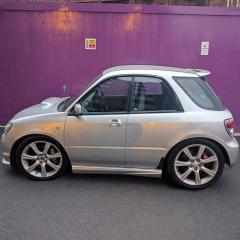
I'm back with a scooby again after a few years without one......

0E1A2426-9883-4753-9327-7A79310B1237-278-000000168AC36CBA_tmp.png


Welcome

Did the lad on scooby net squash ur car lol

  • Author
16 minutes ago, RpsChesterfield said:

Welcome

Did the lad on scooby net squash ur car lol

He sure did....lol

Haha he did my old one i need mine doing lol u no him enuf to do mine lol


  • Author
49 minutes ago, RpsChesterfield said:

Haha he did my old one i need mine doing lol u no him enuf to do mine lol

There a thread on scooby net......just post pic on there and he will do it..... :biggrin::biggrin:

I no but i deleted my account lol

  • Author
5 minutes ago, GeoffLeggy said:

Welcome!

That would do me for an Imp Wagon.  Is it standard with good history? 

Yes standard with K&n cone filter.....it's got 7 stamps in book.....4 of which are Subaru......it's 6k past it's 70k service so that needs to be done next.....

just had an aftermarket back box welded on and it's fully sealed underneath.....could eat your dinner off of it....lol


  • Author
On 15/03/2017 at 9:51 PM, RpsChesterfield said:

I no but i deleted my account lol

Pm me a pic and I will post on there for you.....:artist:

20170316_033801.png

  • Author

Ha ha looks superb.......

Create an account or sign in to comment


Background Picker
Customize Layout

Configure browser push notifications

Chrome (Android)
  1. Tap the lock icon next to the address bar.
  2. Tap Permissions → Notifications.
  3. Adjust your preference.
Chrome (Desktop)
  1. Click the padlock icon in the address bar.
  2. Select Site settings.
  3. Find Notifications and adjust your preference.