Do Not Sell My Personal Information Jump to content
View in the app

A better way to browse. Learn more.

Subaru Owners Club UK | Subaru Forums

A full-screen app on your home screen with push notifications, badges and more.

To install this app on iOS and iPadOS
  1. Tap the Share icon in Safari
  2. Scroll the menu and tap Add to Home Screen.
  3. Tap Add in the top-right corner.
To install this app on Android
  1. Tap the 3-dot menu (⋮) in the top-right corner of the browser.
  2. Tap Add to Home screen or Install app.
  3. Confirm by tapping Install.

Featured Replies

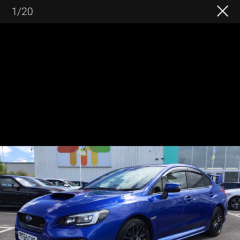
Hi all, would just like to introduce myself, I'm chris and I'm from beverley. I have just purchased my first Subaru, 65 plate wrx sti. Unfortunately I have to wait till next week to pick it up but took it for a run yesterday and wow what a machine.

Any advice on do's and dont's would be much appreciated. 

Thanks for now. Chris 


Welcome mate! You will have to get some pics up of your new machine once you've collected it 👍

Welcome along, nice choice of motor, as has been said get some pics up of said sti when the day comes that you pick it up 👍👍

In the bit where you write theres a tab at the bottom with a little paperclip with choose files next to it click on that and itl ask what file type you want to add then go to you're pics choose one and voila the pic or other media will appear below the text :rolleyes:


@Chris44 that is an absolute beauty mate 😍😍

and in the best colour 😁


Create an account or sign in to comment


Background Picker
Customize Layout

Configure browser push notifications

Chrome (Android)
  1. Tap the lock icon next to the address bar.
  2. Tap Permissions → Notifications.
  3. Adjust your preference.
Chrome (Desktop)
  1. Click the padlock icon in the address bar.
  2. Select Site settings.
  3. Find Notifications and adjust your preference.