Skip to content
View in the app

A better way to browse. Learn more.

Subaru Owners Club UK | Subaru Forums

A full-screen app on your home screen with push notifications, badges and more.

To install this app on iOS and iPadOS
  1. Tap the Share icon in Safari
  2. Scroll the menu and tap Add to Home Screen.
  3. Tap Add in the top-right corner.
To install this app on Android
  1. Tap the 3-dot menu (⋮) in the top-right corner of the browser.
  2. Tap Add to Home screen or Install app.
  3. Confirm by tapping Install.

New member

Featured Replies

Hi all,

fairly new to the Subaru scene. 

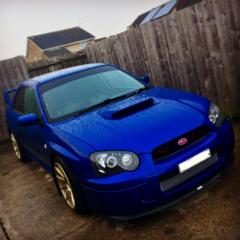
Got a 2003 Impreza wrx, had it about 2 months but I’ve not really driven it much as I’ve been doing some surgery to upgrade it a little. Hopefully will be fully driving next week though 😬. 

I started a insta page to post my mods and generic car pics, feel free to give it a follow (if it’s allowed to promote it) 

instagram: Subaru_Eh94


thanks 😊

C14932D0-008D-4BBB-A086-ED70667C045F.jpeg


Nice car, Nice picture! Bet your Insta looks pretty good! Sadly don't gave Instagram so can't follow you but look forward to updates on here :)

Wotcha and welcome - great motor you have there, feel free to create a project thread on the forum as not sure how many use the instagram app

Create an account or sign in to comment


Background Picker
Customize Layout

Account

Navigation

Search

Search

Configure browser push notifications

Chrome (Android)
  1. Tap the lock icon next to the address bar.
  2. Tap Permissions → Notifications.
  3. Adjust your preference.
Chrome (Desktop)
  1. Click the padlock icon in the address bar.
  2. Select Site settings.
  3. Find Notifications and adjust your preference.