September 21, 20187 yr I'm still going, unless everyone else isn't going as i don't wanna be a 1 man stand lol
September 21, 20187 yr Well thats you ,me and my youngest daughter.. .... shame she can't drive , cos I'd get her to bring the bug sti to help fill the stand lol
September 21, 20187 yr like i've said.. my boat is booked so i'll be there..the trip will start in few hours now^^
September 24, 20187 yr Author Hope everyone got home safely yesterday. Glad the weather eased off. Did anyone get down the strip?
September 24, 20187 yr Author I thought you’d have some pics 👍🏻. Shame about the strip, I’m sure the die hards got a run in before the day ended.
September 24, 20187 yr 6 hours ago, GeoffLeggy said: I thought you’d have some pics 👍🏻. Shame about the strip, I’m sure the die hards got a run in before the day ended. Dave spoke to someone who was lined up waiting near our stand....about an hour and a half later he still hadn't been out on the strip and his car wasn't even close to being at the front of the line!
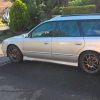
September 24, 20187 yr My scoob was proppa filthy by the time we got there, glad i spent about 10hrs cleaning it 😏 Still enjoyed it and good to meet the few i spoke too and sorry too the one's i didn't get chance too chat with . Took a couple of "hurried" pics of the stand , so sorry if i didn't get everyone's scoob in . I'll try to make the effort to get too a few more s.o.c show stands next year though 😉



Create an account or sign in to comment