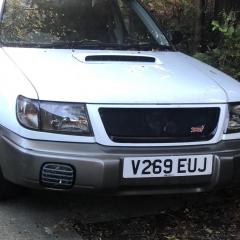
October 25, 20205 yr Evening all, my names Pete, I’m from Newcastle. long time Subaru owner, I count 6 Impreza’s, 1 legacy gtb and just recently bought a 99 SF forester turbo S. I have had with a version 4 STI engine, it was rebuilt last year in September and has only done 500 mile since rebuild. It also has a version 1 STI gearbox and running gear (spare gear I had from an old project that never happened, I believe they’re from an RA) I also own a 2001 Impreza classic facelift sports special edition in cashmere yellow. Iv owned this for around 7-8 years now, it’s been garaged for the past 3 and spent the last 8 month as a driveway ornament as I no longer had a space in my mates garage for it. I was a member of CFNE so some people may recognise the Impreza, (it’s a custard creme colour with black carbon wrapped boot, roof, bonnet and front grill with black and white Cusco graphics along the side) Iv just not had much time for projects over the past few years.
October 27, 20205 yr Wotcha and welcome - feel free to get stuck in post photos etc, all friendly on here 👍



Create an account or sign in to comment