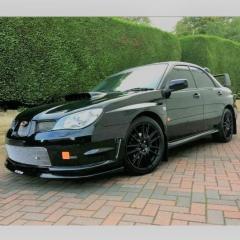
July 7, 201411 yr Just wanted to Say Hello to all. Im from the South West (Cornwall) and a proud owner of a first generation WRX STI Impreza UK version on a 97 plate ®. I have posted an issue I have in the general chit chat forum but for now I look forward to being part of the group. I will add the friendliness I receive from other Scooby owners has been really refreshing whilst out driving around, to start with I was a little shocked by it but it would appear owning the car really is like being part of a club already, with most owners waving to each other, this may just be a Cornish thing but still. On that note, travel safely everyone and keep smiling. Richie.
July 7, 201411 yr Wotcha and welcome Richie - yes it is a friendly bunch for the most part and we can see that reflected in this forum Also wrt your sig... or you didnt quite make that last corner and there is an angry farmer just over the horizon wanting to know who is going to fix his hedge
July 7, 201411 yr Hi mate welcome to S.O.C Yep love the subaru for that family feel amongst 90% of owners anyway :) His Sig is from the Movie Gladiator Jay ;)
July 7, 201411 yr Welcome along:) My fav quote wish in one hand !Removed! in the other and see which fills up 1st. Or Life is like a !Removed! sandwich, the more bread you've got the less !Removed! you have to eat!
July 7, 201411 yr Author Thank you. Yes its from the film Gladiator, I'm a big fan of the film :) Just hope I can get the turbo issue sorted. Thanks for taking the time to say Hello. Richie.



Create an account or sign in to comment