Do Not Sell My Personal Information Jump to content
View in the app

A better way to browse. Learn more.

Subaru Owners Club UK | Subaru Forums

A full-screen app on your home screen with push notifications, badges and more.

To install this app on iOS and iPadOS
  1. Tap the Share icon in Safari
  2. Scroll the menu and tap Add to Home Screen.
  3. Tap Add in the top-right corner.
To install this app on Android
  1. Tap the 3-dot menu (⋮) in the top-right corner of the browser.
  2. Tap Add to Home screen or Install app.
  3. Confirm by tapping Install.

Newbie owner

Featured Replies

After writing off my Audi three weeks ago (over the brow of a hill to find stopped traffic in the wet, into the back of another car not speeding) I've decided to go for it and get myself a 2009 330s!

Picking her up a week on Monday and simply cannot wait!

So hello everyone!


Wotcha and welcome - a fine choice if I may say so - keep us posted and share some pics when you take possession - an early tip, set sport for better mpg over the default I mode

Hello and welcome! :)

Hi mate welcome to S.O.C 

And glad you got rid of that car :D and great choice of car to choose :)

Lol gambit, you do love a good Audi [emoji14]

Welcome btw!

Sent from my iPhone using Tapatalk


  • Author

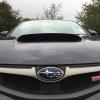
Picked her up yesterday, very happy!!!

post-2997-0-24270500-1410078680_thumb.jp

post-2997-0-26082000-1410078725_thumb.jp

post-2997-0-14838800-1410078759_thumb.jp

Those wheels suit it well [emoji106]

Sent from my iPhone using Tapatalk

Very nice I agree looks smart :D 


  • Author

Just done a 220 mile trip back home and got better mpg then I thought I would! 30 ish granted I was cruising at 70.

  • 2 weeks later...
  • Author

Sport as suggested, haven't really put it in intelligent yet it just feels wrong :-D

Create an account or sign in to comment


Background Picker
Customize Layout

Account

Navigation

Search

Configure browser push notifications

Chrome (Android)
  1. Tap the lock icon next to the address bar.
  2. Tap Permissions → Notifications.
  3. Adjust your preference.
Chrome (Desktop)
  1. Click the padlock icon in the address bar.
  2. Select Site settings.
  3. Find Notifications and adjust your preference.