
aucky
Members
-
Joined
-
Last visited
Everything posted by aucky
-
My wheels do catch but they make more of a banging noise thats why am changing to 17s, but this is a scrapping noise n the lowest thing is the exhaust pipe so I'm guessing its that, I'll take a picture of it and put it up.Going by the rest of the bogged mods the last owner did I was wondering if its the wrong back box, maybe for another model or something.
-
Hi everyone, when am driving my impreza if I hit the smallest of hole or crack in the road it sounds like my back box scraps on the floor, is this normal do they hit the ground all the time.My car is not lowered and at the moment is running on 19" wheels, I have a set of 17s that am refurbing but if I put them on wont it hit the floor even more.The pipe of the back box runs under the rear axle and for a car made for rallying seams a stupid place to be,if I have anyone in the back of the car then its dont go over 30mph or it scraps?
-
I dint say you had not mentioned it a was simply asking questions which you sould be able to answer.isnt it your job to answer questions ?
-
Is it a new magazine and is it your first job in marketin (is that the job title a dont no ) becouse if it is it could be why your so bad at it, just saying.
-
Dont really clarifie what magazine or firm you work for still, or did I miss were it says that [emoji53]
-
Al b watchin for ur car when am round their then [emoji12]
-
Got them off ebay steve, search black subaru angel eyes they were £180 pair.
-
My blobeye 2.0GX use to rumble, that dint have the header on just rest of exhaust, it sounded good but if a turbo pulled up at side of me you could tell the difference, the make of exhaust will probly make a diffrence, my 2003 wrx only has a backbox at min n it sounds crap.
-
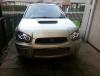
Got mi angeleye headlights done today, car startin to get how I want it [emoji2]
-
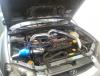
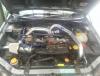
Before n after pics, still need to get a peace of silicone hose to move filter over as its sittin on some pipes at minute.
-
Dint take 1, I'll take 1 tommora when I'v hopefully got my angel eyes fitted as well [emoji1]
-
Fitted mi new induction filter , need a diffrent pipe to fit it how I want it, but its on and looks better then the k&n that I had on before.
-
Hi just wondering if theirs any more members from tarn on here, barnsley for anyone who dont no tarn lol, been seeing lots of imprezas abart lately and a nice forester sti ☺
-
Yeah was just pointing it out as some people would just send the info not realising how much criminals can find out about them from something as simple as that.
-
My Blobeye wrx project
-
What magazine is it, not saying this is doggy but I use to use a motorbike forum years ago and someone put they work't for a mag wanting peoples bike details to feature in the mag, they collected all details and got addresses and would arrange to meet some were for a photo shoot, before that date came the bike got stolen, any real magazine would would have put what magazine they work for.
-
Glad ur ok stu, were did u get the sun strip from, carnt find them in shop just little stickers? Wana sell ur turbo of the car .
-
I fitted my bonnet lifter damper thingimibobs hehe Bmw n audi drivers r !Removed!, they like to drive up the rite hand lane on the dual carrige way were I live n not move over to the left when you come up behind them, I usually loose my rag with them pull along side shake my head n the normal 1 finger wave, then pull back in front of them and slow down to about 20 mph to **** them off
-
thats good enough for me for now
-
lots, more the better , can never have 2 much power
-
Fun police showing their big boys again
-
yeah matt its my top priority after the xmas hols, this may be a daft question but I guess a 3inch pipe is better then the 2.5inch pipe, and they both will fit my current and new turbo
-
No stants not go exhast yet, it's just got a back box on was on car when I got it so don't no what make it is, been looking at the afterburner rapter from scoobyworld.
-
I'd be happy with about 300bhp for now when I got my car it was boosting at 20psi becouse of a bust hose, now I have fix that it boost at 10 psi and just feels a little flat, it don't have any kick anymore, couple of people who have nosey ed at my car have said , not bad but it's only got a baby turbo on you need to stick a bigger 1 on like a sti, so it got me wondering if it would be a straight swap or would I need to fit a sti exhaust or wrx, would my induction pipe need changing, stuff like that, would the extra bhp I got be worth the extra cost?
-
Hi guys.If I was to fit a bigger turbo to my wrx, say a sti turbo, would anything else need changing apart from havin a remap.N will I get more bhp after a remap then with my wrx turbo.[emoji12]