Scoobyghost
Moderators
-
Joined
-
Last visited
Everything posted by Scoobyghost
-
Good stuff. We will keep an eye out for you.
-
I'll be hiding at the back with you then [emoji6]
-
Not so clued up on your model but the sti has a sports cat right?
-
The one in the up pipe. That removes a lot of restriction on the turbo.
-
Pre cat and cat downpipe will effect your spool up. But saying that the guy here has no cats and has a similar graph.
-
Ha yeah all effects the way it hits the rollers. Put it on the 1/4 at japshow [emoji12] I'm going to give Duncan a call tomorrow about my pals vf35 slow spool. I'll report back on it to explain what he advises.
-
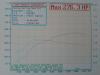
Oh yeah. I see that now. Had to squint at the picture [emoji38]
-
Im just comparing all 3. It's quite interesting to see how the TD04 tails off around 4.5k for both of us. Also, stants you only mapped for just over 1.0bar?
-
Snap! [emoji23] looks really nice. I wondered what it'd look like with black wheels. Very tasty! [emoji106]
-
Welcome along. I was in the same position. I made a build thread so have a flick through that and it may answer a few of your questions. http://uk.subaruownersclub.com/forums/index.php?/topic/12899-Impreza-turbo-2000-uk Impreza turbo 2000 uk
-
Don't hold his tent peg...
-
For your comparison. This shows bhp and turbo boost pressure.
-
But of an old article but grrrr. http://www.dailymail.co.uk/home/event/article-2736818/Chris-Evans-reviews-Subaru-WRX-STi-We-need-Suba-power-The-boy-racers-favourite-bone-shakingly-fast-time-upgrade-bonnet.html
-
A bung...what's a bung? Never heard of one of those before....[emoji12] [emoji12] [emoji12] [emoji48] Gonna be a good weekend at Santa pod! So excited[emoji16] [emoji16] [emoji2]
-
Comes in about 2k peaks 3.3-3.4k but watching the gauge it varies sometimes. It does tail off around 5k. Much more usable power range. I almost went for the larger turbo (05/vf35) but after seeing the lag first hand I decided against it.
-
Got my Xbox service message this morning accepting me into preview [emoji2] [emoji4]
-
I have a friend with the exact same issue. He is making 324hp but turbo doesn't peak until 5k rpm. Did you have it mapped after fitting the turbo? From my research the vf35 is supposedly one of the quickest spoolers in the vf range. Sorry I can't give you any advice towards the problem but you're not alone.
-
Sweet. Thank you Gambit. See what happens but you're right. There's been a mad surge in applicants.
-
I knew what it was all about [emoji4] [emoji4]
-
Because of the announcements at e3. Early access games, back compatibility. I'm not sure everyone understands preview is like a beta test for Xbox updates. I've seen the issues it sometimes creates. Factory resetting xboxs and wiping hard drives.
-
The friend invites you then Microsoft take 24-48 before you actually recieve a message containing the invite. Considering the amount of people now wanting preview I can imagine the work load they have.
-
When we get a reply from Microsoft does it tell us who sent the invite?
-
Sweet. Check that out [emoji2] [emoji2] [emoji106]
-
We need a dedicated convoy thread [emoji23] We are convoying up from Dartford tunnel/M25
-
You all kept that quiet. [emoji23]