Kevin haas
Members (FB)
-
Joined
-
Last visited
-
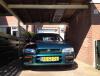
this is my Subaru Impreza 1.6GL, i'm gonna change some things, doing some research at the moment
-
I wil post some pictures later on today :)already so much in love, nothing special yet! waiting for the subwoofer, spoiler, hood scoop. golden rims, new speakers and axhaust http://www.facebook.com/media/set/?set=a.588703644475661.1073741826.100000080932774&type=3#!/media/set/?set=a.588703644475661.1073741826.100000080932774&type=3thank you! i am searcing for some good ones, and i don't have the knowledge what kind fits perfect under my impreza so i'm looking what you guys advice me to look atHello! i am a new driver of a subaru impreza 1.6 GL, 1997, Green, 185,000KM from Utrecht, The Netherlands 19yrs. and i am searcing for a new exhaust, one that crank up te sound :) i don't have to much money to spend on it, i'm hoping some of you pro's could help me with it with Greetings, Kevin!