Do Not Sell My Personal Information Jump to content
View in the app

A better way to browse. Learn more.

Subaru Owners Club UK | Subaru Forums

A full-screen app on your home screen with push notifications, badges and more.

To install this app on iOS and iPadOS
  1. Tap the Share icon in Safari
  2. Scroll the menu and tap Add to Home Screen.
  3. Tap Add in the top-right corner.
To install this app on Android
  1. Tap the 3-dot menu (⋮) in the top-right corner of the browser.
  2. Tap Add to Home screen or Install app.
  3. Confirm by tapping Install.

MY97 STI ALLOYS

Featured Replies

When I bought my STI it came with winter tyres and some scruffy looking alloys


I want to take this opportunity to get a new set for the summer season coming up


I have around £800 to spare for a set, can anyone give me an idea of what looks good on a silver classic for that price?


My consider 2nd had also if anyone knows of a good set going


That kind of budget will get you a host of options, is that for the wheels or wheels & tyres ?

I've always had a soft spot for the rotas or volks/rays there aren't cheap but look the business in my opinion

I would be looking for a set of 5x100 enkei wheels that u see on the newer sti's / widetracks

Or a set of rota boost

  • Author

Yeah £800 including tyres


what about these?


mMS8qYK19u-8LueP_ASi0Cw.jpg


Need to have someone handy with the photoshop magic

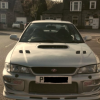
I've got grafite grey rota boosts on my silver classic but they look a bit "lost" in the arches due to being so dark .

I'm thinking of getting them refurbished in either gloss black or silver .

Here's a couple of pics....

Mainly cos im a pic !Removed! anyways[emoji4] post-1399-142641509656_thumb.jpg

post-1399-142641511956_thumb.jpg

Create an account or sign in to comment


Background Picker
Customize Layout

Account

Navigation

Search

Configure browser push notifications

Chrome (Android)
  1. Tap the lock icon next to the address bar.
  2. Tap Permissions → Notifications.
  3. Adjust your preference.
Chrome (Desktop)
  1. Click the padlock icon in the address bar.
  2. Select Site settings.
  3. Find Notifications and adjust your preference.