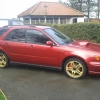
March 22, 201511 yr Hi all. I have just put a deposit down on a 2002 Impreza bug eye wrx wagon. I pick it up a week tomorrow and cant wait! It has a typhoon induction kit and stainless rear section of exhaust. Sounds just right for me to be honest although I would like to remove the typhoon induction kit and put back to standard. Unfortunately it does not come with the standard air filter set up :( I have done a bit of reading on here so far and have plenty more to do! My plans for the car are to have it stock apart from exhaust and a remap.
March 22, 201511 yr Hi mate welcome, you say that now but most of us have modded 'just a bit' then it spirals out of control haha
March 22, 201511 yr Author Hi mate welcome, you say that now but most of us have modded 'just a bit' then it spirals out of control haha Maybe next year, my insurance is steep enough as it is :-\
March 22, 201511 yr Author Fair enough [emoji26] get some pics up after you've collected her ☺!Will do. I shall be on the lookout for standard air box and have a typhoon for sale once I have the keys!Are the air box and cold air feeds identical to the saloon?
March 29, 201511 yr I will say hi as well. I drive round grimsby a lot so might see you on the road. Alex -- I make Films and Website for people



Create an account or sign in to comment