Do Not Sell My Personal Information Jump to content
View in the app

A better way to browse. Learn more.

Subaru Owners Club UK | Subaru Forums

A full-screen app on your home screen with push notifications, badges and more.

To install this app on iOS and iPadOS
  1. Tap the Share icon in Safari
  2. Scroll the menu and tap Add to Home Screen.
  3. Tap Add in the top-right corner.
To install this app on Android
  1. Tap the 3-dot menu (⋮) in the top-right corner of the browser.
  2. Tap Add to Home screen or Install app.
  3. Confirm by tapping Install.

Impreza FOR SALE!

Featured Replies

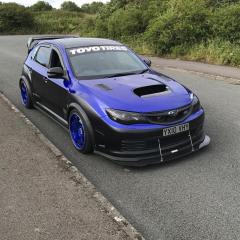
Time has come to sell on my 1.5 R impreza its an 08 its done just 45,000 miles


seen this going on ebay between 3 an half to 4 grand and mine is by far one of the best I've seen for miles plus all the extras i have added 


.full carbon bonnet 

.carbon pillars

.sti interior

.rear parking sensors

.alloy wheels

.custom twin exhaust with burn tips

.no major points on MOT 

.cheap to insure

.All wheel drive


thats just off the top of my head , anything else you want to know just ask i am wanting 4 grand and can't move on the price but its a bargain the car looks and sounds fantastic , all photos since i got it till now can be seen on my gallery 


let me know if your interested guys 


Yep don't think take long to sell to be fair :) 

Create an account or sign in to comment


Background Picker
Customize Layout

Account

Navigation

Search

Configure browser push notifications

Chrome (Android)
  1. Tap the lock icon next to the address bar.
  2. Tap Permissions → Notifications.
  3. Adjust your preference.
Chrome (Desktop)
  1. Click the padlock icon in the address bar.
  2. Select Site settings.
  3. Find Notifications and adjust your preference.