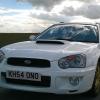
December 3, 201510 yr Hey new to the forum my name is Wendie and proud owner of my WhiteRumbleWagon. The car is an absolute dream
December 3, 201510 yr Hello &welcome looks really nice in white, feel free to get stuck in as we're all friendly here [emoji3]
December 3, 201510 yr Hi mate welcome to S.O.C Do like white scoobs :) And as said above jump straight in on the forum mate all friendly on here so should feel at home :D Also just so you know you have a local meet place at Sheffield Subaru Services hosted by Martin the owner top bloke but he doesn't run them this time of year so hopefully be able to pop along when he starts them up again. :) And share any pictures of the meets we do like our pictures :D
December 4, 201510 yr Author Thankyou for all making me feel welcome And as you said GeoffLeggy not cheap to insure at all but definitely worth it. Sweet that's awesome I shall post some pics up of last meet and the upcoming one



Create an account or sign in to comment