February 5, 201610 yr This was a recent crash here on the Isle of Man where a Subaru went off a cliff with 3 people in it. Somehow I believe they all escaped with minor injuries? They are very lucky people indeed! http://www.three.fm/news/isle-of-man-news/car-which-crashed-on-marine-drive-recovered/
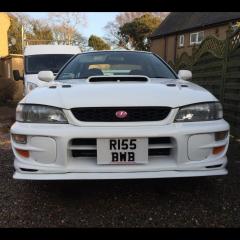
February 5, 201610 yr I'd be selling the full car spares or repair. Overall good condition, few marks around the body as you would expect for a car of this year! All tyres were new 2k miles ago, wheels have the odd scuff but hardly noticeable. Wheels were replaced with brand new set last year. Interior needs some care, heated seats I say heated they get warm when the suns on them... toasty, heated rear window when in place, 6 disk multichanger somewhere in the boot along with toolkit and spare wheel. Standard unmolested Subaru Impreza which are hard to find nowadays! No tyre kickers or time wasters.
February 5, 201610 yr I'll supply a bottle of T-cut for the buyer. I would do it myself but unfortunately just don't have the time.
February 5, 201610 yr Author changes in circumstances forces sale, grab a bargain at a rock bottom price!



Create an account or sign in to comment