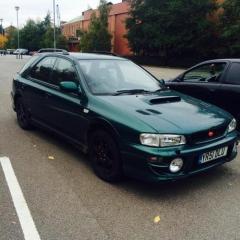
March 14, 20169 yr Just looking for some advice really on anything in general to do with the 2001 late classic 2.0 Impreza Sport Wagon/Estate Non Turbo. Also websites/shops to purchase parts from :)
March 15, 20169 yr Welcome! Looks nice . Feel free to ask any specific questions. Have you had the car long? For parts these are very good. http://www.importcarparts.co.uk/parts?cat=96&sub=97&sec=137
March 15, 20169 yr Author Thank you! :) I bought it about October time, not a big fan of having to pay £3000 a year insurance though haha
March 15, 20169 yr Really? 3k for non turbo? How many ncb you got? Any experience driving awd cars? Did you shop around? Sent from my SM-G900F using Tapatalk
March 15, 20169 yr Author 1 year, because I'm 19 that was the cheapest I could find where it's monthly payment. I'm not really too sure what I wanna do haha fairly new to Subaru's and I'm finding it hard to find any parts that are not for turbo models!
March 16, 20169 yr Wotcha and welcome - yup as Matt said - drop some weight (rear seats etc) and look at chassis upgrades



Create an account or sign in to comment