Do Not Sell My Personal Information Jump to content
View in the app

A better way to browse. Learn more.

Subaru Owners Club UK | Subaru Forums

A full-screen app on your home screen with push notifications, badges and more.

To install this app on iOS and iPadOS
  1. Tap the Share icon in Safari
  2. Scroll the menu and tap Add to Home Screen.
  3. Tap Add in the top-right corner.
To install this app on Android
  1. Tap the 3-dot menu (⋮) in the top-right corner of the browser.
  2. Tap Add to Home screen or Install app.
  3. Confirm by tapping Install.

Hi there back in a Subaru

Featured Replies

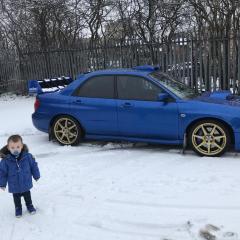
Hi very one just got my second subaru blob eye looking forward to seeing a few around. 

Can any point me in the right direction iv been searching online for a stock exhaust and cd facer. My exhaust is too loud and my cd facer need replacing.

Cheers 😊

Too loud for my street!


Welcome!

What is the set up you have currently?  Decat, aftermarket backbox etc?  If you just have a massive can backbox then you should be better with something like the following.

http://www.ebay.co.uk/itm/subaru-impreza-wrx-sti-genuine-exhaust-bugeye-blobeye-hawkeye-backbox-rare-/182187611704?hash=item2a6b3a5638:g:~F0AAOSwmtJXb9mz


Welcome mate

i have a standard rear box off of my hawkeye if you fancy a deal on your loud un

  • 2 weeks later...

Create an account or sign in to comment

Background Picker
Customize Layout

Account

Navigation

Search

Configure browser push notifications

Chrome (Android)
  1. Tap the lock icon next to the address bar.
  2. Tap Permissions → Notifications.
  3. Adjust your preference.
Chrome (Desktop)
  1. Click the padlock icon in the address bar.
  2. Select Site settings.
  3. Find Notifications and adjust your preference.