Do Not Sell My Personal Information Jump to content
View in the app

A better way to browse. Learn more.

Subaru Owners Club UK | Subaru Forums

A full-screen app on your home screen with push notifications, badges and more.

To install this app on iOS and iPadOS
  1. Tap the Share icon in Safari
  2. Scroll the menu and tap Add to Home Screen.
  3. Tap Add in the top-right corner.
To install this app on Android
  1. Tap the 3-dot menu (⋮) in the top-right corner of the browser.
  2. Tap Add to Home screen or Install app.
  3. Confirm by tapping Install.

Featured Replies

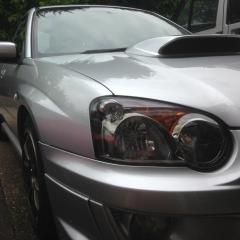
Hi guys, I picked up my first Scooby WRX a couple of weeks ago. I had a Nissan 350z before that and I have to say I am enjoying this so much more!!

Very happy with it, has a few mods such as lowering springs, straight through exhaust and a remap. I have never had a turbo car before and I think I am now hooked.

I look forward to seeing a few of you at some meets!

IMG_5538.JPG


Welcome!! Glad you're enjoying the other side to the Japanese life, plenty of information and modification advice if you ever want to squeeze some more out of it.

Sent from my iPhone using Tapatalk

Very nice looking blobeye. And welcome to S.O.C :wink:

Lovely looking car always been my favourite the blob-eye shape!


Welcome along to the club nice motor you got there 

Greetings!  I had one of those new from 2004-2006.  Fantastic car, enjoy  :-)  Suggest to check the oil level regularly, the guy who took my car didn't & the engine seized a couple of years later.

Create an account or sign in to comment


Background Picker
Customize Layout

Configure browser push notifications

Chrome (Android)
  1. Tap the lock icon next to the address bar.
  2. Tap Permissions → Notifications.
  3. Adjust your preference.
Chrome (Desktop)
  1. Click the padlock icon in the address bar.
  2. Select Site settings.
  3. Find Notifications and adjust your preference.