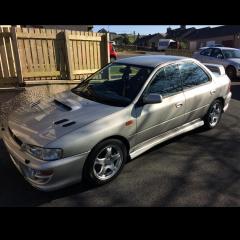
January 16, 20179 yr Author It needs a new exhaust from the cat back so I am going to put a stainless steel centre section and original Subaru STI back box. I've got a 6 month old system for a 2000 turbo that's genuin Subaru as well. That took a long time to find at the right money! It needs a new alarm as the original has bit the dust and only opens with the key, and apart from servicing it and only running it in summer not much else! Iam a sucker for keeping it original.
January 17, 20179 yr Iam a sucker for keeping it original. Those aren't original wheels for that model 😜😘
January 17, 20179 yr Author Ah but they are Subaru alloys.. I've known the car for a long time and it's always had these on. Was there not an option for alloys when you bought one new?
January 17, 20179 yr I believe they're earlier Impreza wheels. Afaik these were standard wheels for v5-v6 cars
January 17, 20179 yr Author From what I can find they were an optional wheel. They look better than the others too, at least in my opinion. Each to his own. Mine is a bit colour coded too, and it has a leather interior that I found last year. Not so original then! Haha.



Create an account or sign in to comment