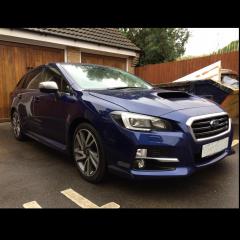
April 2, 20188 yr Howdy! We decided to upgrade our transportation last year and ended up with a couple of nice Subarus. The wife was a little sceptical when I suggested it - Colin McRae was mentioned (plus I used to do a bit of rallying back in the day) - but when I showed her the cars she warmed up. After a trundle to the dealers for some brochures and then another for a test drive she ended up with a new XV 2.0i SE Premium, which she loves. It paid for itself in the snow a couple of weeks back too (is there a smug-face one of these things?!) Anyway, I've found some useful information on here so I thought I'd sign up and perhaps pass on some of my (limited) experience. Oh, and I got a Legacyrevolutiontouring from the IM fleet, which I like Cheers, Seb.
May 18, 20188 yr Author Thanks for the welcome. We love our cars (plus I secretly always wanted an estate!) I do like having unusual cars, but, since getting the pair last summer, and then actively looking for Subarus whilst out and about, I feel slightly sorry for the rest of the car-buying public, as I'm amazed at how few I see (I doubt I've seen many more than 20 individual cars since July, and there are four others in the village.) Still, it's their loss!...



Create an account or sign in to comment