Do Not Sell My Personal Information Jump to content
View in the app

A better way to browse. Learn more.

Subaru Owners Club UK | Subaru Forums

A full-screen app on your home screen with push notifications, badges and more.

To install this app on iOS and iPadOS
  1. Tap the Share icon in Safari
  2. Scroll the menu and tap Add to Home Screen.
  3. Tap Add in the top-right corner.
To install this app on Android
  1. Tap the 3-dot menu (â‹®) in the top-right corner of the browser.
  2. Tap Add to Home screen or Install app.
  3. Confirm by tapping Install.

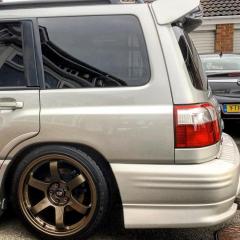
I must get back online to using forums so here we go with my SF5..

Featured Replies

Well hello đź‘».. I joined this forum in February I think..

I never use forums anymore which years ago I used to be logged on to many forums everyday. Every now and then I hover over Scooby net and have a look at posts etc.. anyways I’m going to be more active on forums so here’s a quick up date of my forester sf5... I’ve actually just fitted some bc coilovers, reconditioned 4 pot callipers with braided lines, genuine gold F emblem for grille etc etc I actually was running some eBay coilovers lol.. it was only a temp measure but 2 years later LOL.. they actually where NOT BAD...

Also 

1. Who has Instagram?add me if you like.. Mine is ricer_forestersti 

2. Car shows? I’m going to tag along to one  if you have a stand etc and that’s ok? I went to Scottish car show this year and that was pretty decent.

3. Any local owners? I’m based on penshaw Tyne and Wear, hopefully will catch up with some folk.

4. Is there a forum app instead of using the browser?

Thanks ash

45F4FAFF-C0DC-4DDC-9F13-DB6CC4FCF46A.jpeg

8ABEA17D-CD21-4F24-8E71-0FD7CB8CEE65.jpeg

5A5D4FC5-F66B-42CF-96CE-95B6886D871C.jpeg

9C7438BE-BB03-4CB6-8A88-B0D288E55EED.jpeg

3DD95870-2CC0-4EF7-B33B-E458B5FE4CC2.jpeg

CBDB224C-7433-43AD-81BB-B5102EEAEA97.jpeg

0E86E440-966D-490C-B653-97B022C9C38B.jpeg


what's the idea behind the front numberplate ?

  • 2 weeks later...
  • Author

It’s a JDM tilt bracket for extra Japanese scene points.


Create an account or sign in to comment


Background Picker
Customize Layout

Configure browser push notifications

Chrome (Android)
  1. Tap the lock icon next to the address bar.
  2. Tap Permissions → Notifications.
  3. Adjust your preference.
Chrome (Desktop)
  1. Click the padlock icon in the address bar.
  2. Select Site settings.
  3. Find Notifications and adjust your preference.