Skip to content
View in the app

A better way to browse. Learn more.

Subaru Owners Club UK | Subaru Forums

A full-screen app on your home screen with push notifications, badges and more.

To install this app on iOS and iPadOS
  1. Tap the Share icon in Safari
  2. Scroll the menu and tap Add to Home Screen.
  3. Tap Add in the top-right corner.
To install this app on Android
  1. Tap the 3-dot menu (⋮) in the top-right corner of the browser.
  2. Tap Add to Home screen or Install app.
  3. Confirm by tapping Install.

hi im new

Featured Replies

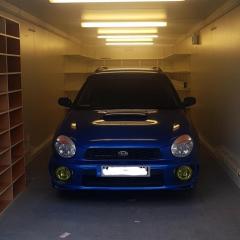
good evening people, im phill i have had alot of different cars and currently just waiting to pick up my first subaru a bugeye wrx wagon i also own a mk2 fiesta xr2,  i work has a dog handler in kent, thats enough about me but i just wanted to say hi 🙂


welcome, plenty of good advice on here, pics always appreciated.🙂

  • 3 weeks later...
  • Author

hello and cheers i have had the car now 3 weeks and i have owneed alot of cars and this one never fails to  make me smile i shal up load photos but having trouble uploading on here 😊

20190131_125529.jpg

  • Author

tha k ypu some wofk being carried out today on it aswell 


  • Author

* thank you some more work is being done today on it aswell 

Create an account or sign in to comment


Background Picker
Customize Layout

Account

Navigation

Search

Search

Configure browser push notifications

Chrome (Android)
  1. Tap the lock icon next to the address bar.
  2. Tap Permissions → Notifications.
  3. Adjust your preference.
Chrome (Desktop)
  1. Click the padlock icon in the address bar.
  2. Select Site settings.
  3. Find Notifications and adjust your preference.