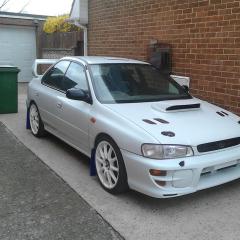
July 19, 20196 yr Hi all, been a member on here for a while but probably not as active as others! Anyway enough Bull****, I finally got the subaru on the road and tested today and can't believe what I've been missing. Took 5yr but worth it just for the grin factor alone.
July 21, 20196 yr Looks tidy, nice choice chap . Was it a major project, or was it a case of finding the time to do it ? Either way bet it was worth it 😊
July 22, 20196 yr Author Thanks, started of with a few bodywork issues and a blown engine but ended up as a full rebuild! Probably would of took a lot less time but when you try to manage your spend and change your mind over the time you have it, it just ends up being a long time. Especially when your expected to do jobs round the house and extra hrs at work to pay for it all! Goes canny well like, better than I'd imagined. Of to get it laser aligned this afternoon 👍
July 23, 20196 yr On 7/22/2019 at 9:52 AM, Meatballhead said: Thanks, started of with a few bodywork issues and a blown engine but ended up as a full rebuild! Probably would of took a lot less time but when you try to manage your spend and change your mind over the time you have it, it just ends up being a long time. Especially when your expected to do jobs round the house and extra hrs at work to pay for it all! Goes canny well like, better than I'd imagined. Of to get it laser aligned this afternoon 👍 Can completely empathise with that - but all come together in the end



Create an account or sign in to comment