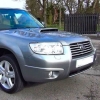
March 13, 201412 yr Hi all, I've just bought a 2007 Forester 2.5 XTen, searching for useful info online and found this forum, so I thought I'd say hello. Very impressed with the car so far, never owned a Subaru before but I've driven an Impreza WRX. Amazed that the Forester doesn't feel that much different! Anyway, here are couple of pics I look forward to annoying you all with loads of stupid questions :D Steve
March 13, 201412 yr Wotcha and welcome - great looking fozzy we have quite a few members with similar vehicles so feel free to browse get involved and ask as many questions as you want :)
March 13, 201412 yr Author Thanks for all your replies :D As promised, I've posted my first question about a new exhaust here http://uk.subaruownersclub.com/forums/topic/5413-stainless-post-cat-exhaust-for-forester-in-the-south/ Cheers Steve
March 14, 201412 yr Nice motor Steve....and welcome. I want a late 55 plate turbo in the future, but could be a while before I dare part with my N/A forester, I love it that much haha



Create an account or sign in to comment