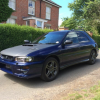
July 30, 201411 yr Hi Guys My names Keith and I Just bought my first Impreza been wanting one for a while but funds would'nt allow it. Finally got one picked it up on Friday. Looking forward to working on it and seeking advise from the more experianced owners. Pics below
July 30, 201411 yr Wotcha and welcome - great to have another wagon onboard, check out Matts work on his motor, not exactly standard anymore http://uk.subaruownersclub.com/forums/topic/5124-uk-v5-wagon/ http://uk.subaruownersclub.com/forums/topic/6316-sti-wagon-spoiler/
July 30, 201411 yr Hi mate welcome to S.O.C Great bunch on here so please feel free to jump right on in and get to know everyone :D
July 30, 201411 yr Author Thanks for the warm welcome really want to get out to some meets so any future ones planned in the berks bucks Surrey area let me know would be great to meet a some members. Is there anyone in the Berkshire area Windsor,Maidenhead,Slough,Reading?
July 31, 201411 yr Have a look in the regional meets section, scooby pete's from down that neck of the woods so I'm sure he'll be able to help you on that one



Create an account or sign in to comment