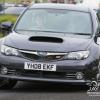
September 27, 201510 yr Hey there, Thought I'd introduce myself! I'm Ben, from Coventry and now own an 08 Impreza WRX STI Type UK Hatchback with Prodrive Performance Pack. Picked it up last month with 25,000 miles on the clock and couldn't be happier with it (of course I could, thats what mods are for! :P ) What I've done to it so far.. - Took it on 2 track days! - Upgrade from 17" Factory wheels to 18" Rotas. - Changed OEM Head Unit to a Alpine iDE-178BT. - Rear windows tinted. - Wind deflectors fitted. - Ordered (should be here this coming week hopefully): Whiteline BSR49XZ Rear 22mm Anti Roll Bar. - Ordered a set of mudflaps too as it likes to have streaks of dirt from the arches! Will be getting a set of BC Type RA Coilovers fitted some time in November. Here's a quick couple of pics of course. I also have an AEM CAI which I had on for a day, loved the sound, but had the feeling the car wasn't running right and pick-up felt a bit slower so I put the stock air box back in.. Having read up a bit it seems it would need a remap? Thanks :)
September 28, 201510 yr Looks very nice welcome :-D -- I make Films, Websites and social media for people



Create an account or sign in to comment