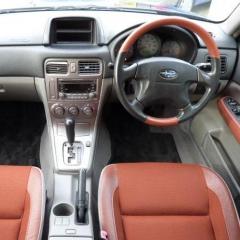
April 4, 20178 yr Hello guys,First post here. I was thinking about Forester for some time now. It's not a common car here in Surrey and it has charisma. So on 1st of April I bought one from David at goodmayesmotors. Subaru Forester XT 2002 imported from Japan 32000 ml on the clock, clean with beautiful unusual amber seats and big sunroof.The car drives nicely! Unusual high position, very quick and the engine is virtually silent compare to my Honda Civic 1.8 I had before.I feel very excited to start exploration of something completely new to me.
April 4, 20178 yr Welcome! Fantastic buy that is. I'm excited for you! Be nice to see some more interior pictures when you get a chance. Hope you enjoy the forum
April 4, 20178 yr Author Few more pictures. Those are website photos made by David, but I like them. and one more. The car has it's name already Lulu and become a family member instantly. Every body loves it. Thanks guys.
April 4, 20178 yr I know it won't be everyone's cup of tea but I really like it 😍, wish mine had something similar.



Create an account or sign in to comment