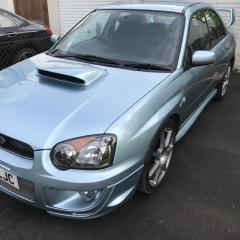
May 4, 20196 yr Hi everyone, i have just gotten back to being a Subaru owner and i am now the proud owner of a WR1. its been on my bucket list for over 12 years and i have finally been in a position to get one. it needs a few bits doing on it for my peace of mind, but that's booked in next week for the repairs (Clutch/Timing Belt & Water Pump). I can't wait to take full advantage of the car once these bits have been repaired and hopefully get to some of the meetings in the south west if there are any. after the long drive back yesterday, its getting a good wash and polish tomorrow where i dare say photos maybe called for.
May 4, 20196 yr Welcome to the club. Looking forward to the photos, absolutely love the colour of the wr1! I’m in the south west, we’ve got a few members dotted about, will have to try and sort a meet somewhere over the summer.
May 4, 20196 yr Welcome along 👍. I'm new here too, seems like a good forum so far! Looking forward to seeing some pics of the car :).
May 5, 20196 yr Welcome mate ,, wr1 are smart like 👍 dont see many of them about up my way , look forward to your pics 😍



Create an account or sign in to comment