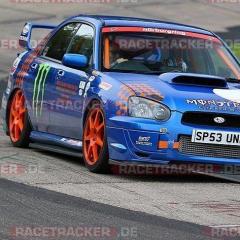
August 19, 20196 yr Hello again, Was here when I raced one of my previous Imprezas I have bought another Impreza to go with my other cars but I will get shot down if I share them. Here is a picture from my recent visit to the Nurburgring
August 19, 20196 yr Always nice to see a scooby on track 😎 I wouldn't worry about not telling us what other marques of motors you have well...... unless its a vtec Honda, then I'd just keep quiet about that 🤔😂😂 I just sold one of my scoobies and bought a audi to go alongside my vw caddy workhorse..... they haven't banned me yet .
August 19, 20196 yr Author Cool Ok I have a BMW M3 and a 435i. Never had a Vtec Honda...……………………….. yet lol
August 19, 20196 yr Nice choice 👍 My brv had a 135i m sport ,8 speed flappy paddle with over 300hp to the rear wheels as standard (what's not to like) . Admittedly ,Hes now got a 535d x drive , so he can go to the shops in the rain or snow without worrying about ending up in a ditch 😉
August 19, 20196 yr Author yes they can be tail happy even with tc on. Think I might try and find a M4 exhaust manifold with twin turbos to replace the single turbo but I have it up to the M3 power of 420 already
August 19, 20196 yr Keep ummming and arrrring about paint my wheels a nice bright colour, you may have swayed the boat [emoji15][emoji16] lolWelcome back too!!Loud pipes save lives



Create an account or sign in to comment