November 16, 201411 yr Hi everyone. So today I got my car dynoed at tuning developments and it rolled out 260bhp and 275ftlb i was quite happy with these figures considering it's standard and 18 years old. So now the question is what next? whats the best ways to get a little more out of her? Would be nice seeing figures around 300 mark, so what would be the process? (Best mods ect). And does anyone know a good subaru specialist to take my sti to get mapped at some point? Cheers
November 16, 201411 yr Decat or sports cat, air filter fuel pump injectors, remap. easy see the figure your after [emoji51]
November 16, 201411 yr Author Cheers guys and a td04. Where's a good place for mapping these? do they have plug in with it being an older motor?
November 16, 201411 yr What year is it ? Yeah td05 will max out at 280 ish mate. But it's a great turbo if you want fast acceleration but Td05 is good upgrade maybe the cheapest
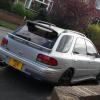
November 17, 201411 yr just sawy your pic, take its a v4? You will need a daughter board ECU set up or go stand alone like a apexi unit! Yes the TD05 front entry turbo bolts strait on Savagebulldogs is the man in the know on these earlier scoob mapping etc



Create an account or sign in to comment