March 29, 201510 yr Alreet everyone just bought a 2003 inpreza wrx blobeye and i absolutely love it safe to say i have been after one for 8 year now and eventually got one :)
March 29, 201510 yr Welcome to the club! Feel free to Chuck up some pics. 8 year is a long time to wait for a scoob.
March 29, 201510 yr Author Aye im just trying to work out how to upload them as im using my phone, and aye i know it was since i passed my test always wanted one but insurance put me off the last week i thought f**k it im getting one haha
March 29, 201510 yr Same as me. Wanted one as a kid now at an age I can afford it. Are you using tapatalk?
March 29, 201510 yr Hello mate welcome to S.O.C and to scoob ownership :) feel free to join in on the forum great bunch on here all friendly. And we like our pictures so feel free to share some of the car :)
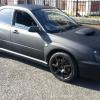
March 29, 201510 yr Wotcha and welcome - I to had a laugh at the little kiddy looking on - then I spotted the batman badge - looks awesome, great finish
March 29, 201510 yr Author Ah haha i have just realised haha that will be my son loving the turbos from a young age
March 29, 201510 yr Welcome! Where did you get the batman badge/centre caps from? They're seriously cool!
March 29, 201510 yr Author Cheers mate need some bits and bobs done to it, any ideas for the engin bay?



Create an account or sign in to comment