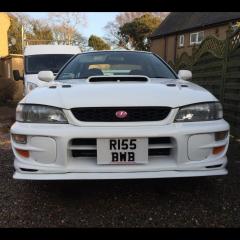
February 28, 201610 yr Just given her a quick clean so thought I'd finally pop up a few pics just having her sat on the drive puts a grin on my face shame about the gravel drive though means the wheels are dirty as soon as I move it 😢 dont know how to turn the two photos?!
February 28, 201610 yr Do like a white saloon, lovely looking example [emoji106] Maybe try rotating the pic on your device and saving it then post it ? If it's not broke .....upgrade it 😊
February 28, 201610 yr Author got it! Cheers savage! cant wait to get her all serviced and squared up for summer oh and one the one way system on the mountain tt course
March 9, 20169 yr I've really started to luke the white scoobs of all year's. I'm wanting a white hawkeye at the minute been looking at a few 😂 but nice tidy classic like this I wouldn't say no.
March 9, 20169 yr Author I never really liked white cars (probably because my white van is white and tatty and filthy) until I started seeing some nice clean white scoobs, I think the thing with them is that you can tell how well they've been looked after as it starts to show very easily, body work wise this is nearly mint apart from some minor de-laquering around the back window and a couple of tiny spits of rust



Create an account or sign in to comment