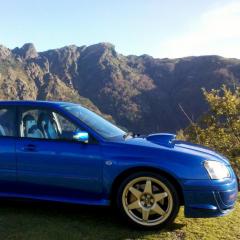
January 31, 20179 yr Hello guys I´m new in the forum I have some turbo cars as one of my best is the subaru impreza sti v8 from 2003 I upload a photo of the car
February 6, 20179 yr Author many thanks guys! I like to enjoy as a track car but the subaru is for all, I own cossies and evos and I don't know why I'm in love with the subaru, I don't know if here I can post some videos of my car. Here playing as I was changing oils, brake fluis,diff gearbox oil and we do a little video enjoying www.youtube.com/watch?v=gOTTSCVSl9s I will upload more videos and photos if you like or want .
February 7, 20179 yr I'd love gold wheels but it's the one thing the mrs has put her foot down about [emoji20] Not something I can really 'stealth' onto the car either lol Sent from my iPhone using Tapatalk
February 8, 20179 yr Have you tried saying that the wheels have always been gold but dirty and you have only just cleanef tjem thats why they appear gold now
February 8, 20179 yr Haha not when I'm already an obsessive car washer, no [emoji14] Sent from my iPhone using Tapatalk



Create an account or sign in to comment