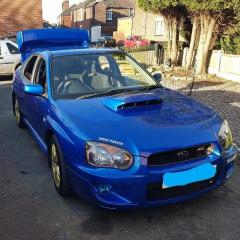
March 28, 20178 yr HI All, I'm Topblades and new to the forum site, I have a 2004 blobeye that needs a little TLC, but i'm working on it now cleaning like under the bonnet and so on the paint work is ok. I'm not sure if its ready for a show but I would like to go to the japfest but don't know if its good enough for the club stand. So the question is how do I find that out ? weather its good enough for the club stand or not. The owner before me was in this club and the car has the club stickers, so I think he has been the japfest with it but not sure.
March 28, 20178 yr Hi n welcome . All subarus are welcome on the club stands bud ..... ,hell we had a ford ka sneak in 1 year [emoji55] cos a members scoob spat it's dummy out a couple of days prior to a event [emoji57]
March 29, 20178 yr On 28/03/2017 at 7:22 PM, Topblades said: Thanks How much is it and is it per person or per car? Welcome! More than welcome mate go to the following and crack on! Hope to see you there. You have until 2nd April btw



Create an account or sign in to comment