April 13, 20178 yr Guys, could you advice on good local to Sutton (SM1) area car audio shop to install head unit and choose and install speakers for my Forester? Thanks.
April 14, 20178 yr Don't know about any places in that !Removed! but you will be shocked at how easy it is to do bud Sent from my HTC One M9 using Tapatalk
April 14, 20178 yr Don't know about any places in that area but you will be shocked at how easy it is to do bud Sent from my HTC One M9 using Tapatalk Sent from my HTC One M9 using Tapatalk
April 14, 20178 yr As above - save your money and have a go yourself, it is a very straightforward job. Headunit and speaker choice will be down to your budget, obviously you can spend quite a bit
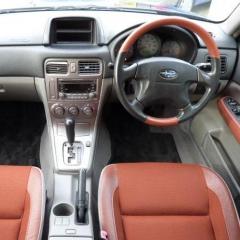
April 14, 20178 yr Author I found local garage briancarsounds to install the audio + speakers. I think the price is reasonable, quality of installation is good. No complaints. The guys suggested Audison Prima speakers at the front. http://www.carsoundstudio.com.au/audison-prima-speakers/ and the radio I bought myself Kenwood DPX-7000DAB Car Stereo Sound is amazing plus hands free functionality. 2 pairs of speakers (£150) installation work head unit (£50) speakers (£100) => Total £300
April 19, 20178 yr 50 quid to install a headunit. Its literally unplugging a connecter block and plugging new one in lol has this brian got any jobs going lol



Create an account or sign in to comment