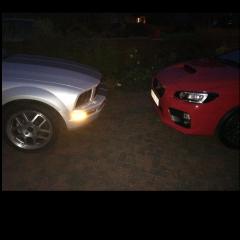
November 14, 20169 yr Hello dudes and dudettes, I have just taken delivery of my 2016 WRX STi, and after being waved at by a fellow WRX owner and through good old google I have found your cosy looking group. I also own a 2006 Ford Mustang (probably shouldn't mention Ford, please forgive me). Having told myself and the partner the WRX STi is a more sensible daily due to the AWD, I purchased one. Not many pictures at the moment as the weather is well..... very british. Regards Bruno.
November 14, 20169 yr Welcome. Tbh its more honda that is a stoning offence,,, although which engine is in the mustang?
November 14, 20169 yr Hello & welcome, not seen one in red beofre, suits it well 🖒 Wouldn't worry about the Ford, we're on with a bit of lighthearted Honda bashing at the mo ! Feel free to get involved were all friendly Sent from my SM-G930F using Tapatalk
November 14, 20169 yr Author The mustang is the baby 4.0 v6. I was told there's only 3 in red in the uk as it is a US colour. Thanks chaps. Glad we just got rid of our civic then 😂
November 14, 20169 yr Author At least I'm honest about it [emoji12] Sent from my iPhone using Tapatalk
November 14, 20169 yr hahaha, mate has one of the new ones, sounds good, bit quiet and handels like a pig though lol
November 14, 20169 yr Author 2 hours ago, Tidgy said: hahaha, mate has one of the new ones, sounds good, bit quiet and handels like a pig though lol Yeah they're not great when the roads are slightly wet. Ence my subaru choice 😂
November 16, 20169 yr Author Thank you all. Hopefully I'll see some of you out and about. Sent from my iPhone using Tapatalk



Create an account or sign in to comment