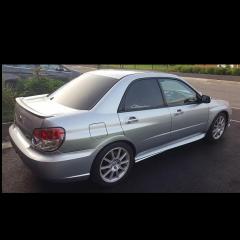
November 22, 20169 yr Watch out people, http://www.ebay.co.uk/itm/SUBARU-IMPREZA-SPECIAL-EDITION-RB5-WRX-STI-STUNNING-WITH-FRESH-PAINT-amp-LOW-MILES-/162283306244?rmvSB=true&clk_rvr_id=1127618415962&nma=true&si=8yLs8O44OjZ32T6RYLim7E2vH%2FU%3D&orig_cvip=true&rt=nc&_trksid=p2047675.l2557 then http://www.rb5oc.co.uk/gallery/rb5-268.asp holy badgers ring piece
November 22, 20169 yr It was only a cat d! What a mess of it. Be gutted as the new owner to find out it was in such a horrific accident.
November 22, 20169 yr Author suspect it was a cat B, car was bought and parts put into a new shell. aka, its not an RB5
November 22, 20169 yr Would be nice to get the chassis number and do some digging. Never know it might turn up on here or the rb5 forum.
November 22, 20169 yr awful spray too as not stripped much skirts left on, door fittings, bonnet fittings etc, will be overspray signs and poor edge finish everywhere, someone wasted 2.5k :-/
November 23, 20169 yr Holy fooking shamoly theres no way thats a cat D, when or if the new owner finds out about that they going to be proper raging how could someone sell that as a genuine rb5 i suppose some people have no shame



Create an account or sign in to comment