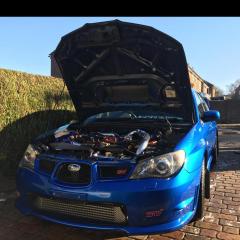
December 4, 20169 yr Good evening, Thought I'd sign up as I've just bought a UK Spec STi. Car needed a good detailing as the paintwork was shocking see the finished article. Just bought as a toy to get me back on the tuning scene. Now to enjoy her a little
December 5, 20169 yr Nice motor [emoji1305] any more pics ? Any mods ? Sent from my Nokia 3310 using Tapatalk
December 5, 20169 yr Author Front mount, full Miltek Turbo back, hks filter, forged engine, TD MD555 Turbo running 1.4bar boost at 370bhp, HKS SSQV, Japspeed alloy rad, Oil catch can, HSR coilovers, stage 2 clutch off the top of my head.
December 8, 20169 yr Front mount, full Miltek Turbo back, hks filter, forged engine, TD MD555 Turbo running 1.4bar boost at 370bhp, HKS SSQV, Japspeed alloy rad, Oil catch can, HSR coilovers, stage 2 clutch off the top of my head. Lovley looking motor sounds like a well sorted setup to ;) Sent from my Nokia 3310 using Tapatalk
December 16, 20169 yr Looks really nice. Just picked up one myself a few weeks ago. Out of curiosity, how much did you pay for yours if you don't mind me asking? Mines basically all stock (just a cat back exhaust, DEFI gauges, boost controller. Nothing major like yours).



Create an account or sign in to comment