Do Not Sell My Personal Information Jump to content
View in the app

A better way to browse. Learn more.

Subaru Owners Club UK | Subaru Forums

A full-screen app on your home screen with push notifications, badges and more.

To install this app on iOS and iPadOS
  1. Tap the Share icon in Safari
  2. Scroll the menu and tap Add to Home Screen.
  3. Tap Add in the top-right corner.
To install this app on Android
  1. Tap the 3-dot menu (⋮) in the top-right corner of the browser.
  2. Tap Add to Home screen or Install app.
  3. Confirm by tapping Install.

Introduction RB5 280.

Featured Replies

Hi guys, 

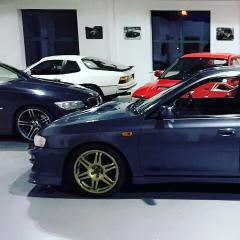
Thought I would introduce myself as I am new to the forum. I have owned my Subaru RB5 for a number of years. She's number 280.

Pretty much standard specification other than a Blitz Nur Spec R exhaust and a HKS filter  

Thanks. 

Gareth. 

IMG_3719.JPG


  • Author


IMG_3714.JPG

IMG_3715.JPG

IMG_3713.JPG

Welcome along

Nice RB5 and cheeky little 924 in the background

Sent from my HTC One M9 using Tapatalk

  • Author

Thanks! 

wotcha and welcome - that motor looks cleeeeeen :thumbup1: feel free to get stuck in - all friendly on here

also I cannot see the additional three images you posted??


  • Author

Thanks Jay, I'm unsure why you can't see them. I will try and repost them a little bit later on. 


  • Author

Thanks Guys!!! :biggrin:


  • Author

Thanks Geoff. 

Create an account or sign in to comment


Background Picker
Customize Layout

Account

Navigation

Search

Configure browser push notifications

Chrome (Android)
  1. Tap the lock icon next to the address bar.
  2. Tap Permissions → Notifications.
  3. Adjust your preference.
Chrome (Desktop)
  1. Click the padlock icon in the address bar.
  2. Select Site settings.
  3. Find Notifications and adjust your preference.