
SOC Admin
Administrators
-
Joined
-
Last visited
Everything posted by SOC Admin
-
What are the actual problem and symptoms of the fault that is showing?
-
There is quite possibly an auto-tensioner which is acting against the belt to keep correct tension. Usually requires a spanner of the correct size to turn the tensioner away from the belt
-
Its hard to say - is it a knock or a tapping noise? Top of the engine or lower down? When the engine oil is due to be changed I would use a quality (OE spec) oil filter and it would help to flush the engine (an additive or detergent that breaks down carbon build up) and then replace the oil with a quality oil (Castrol, etc)
-
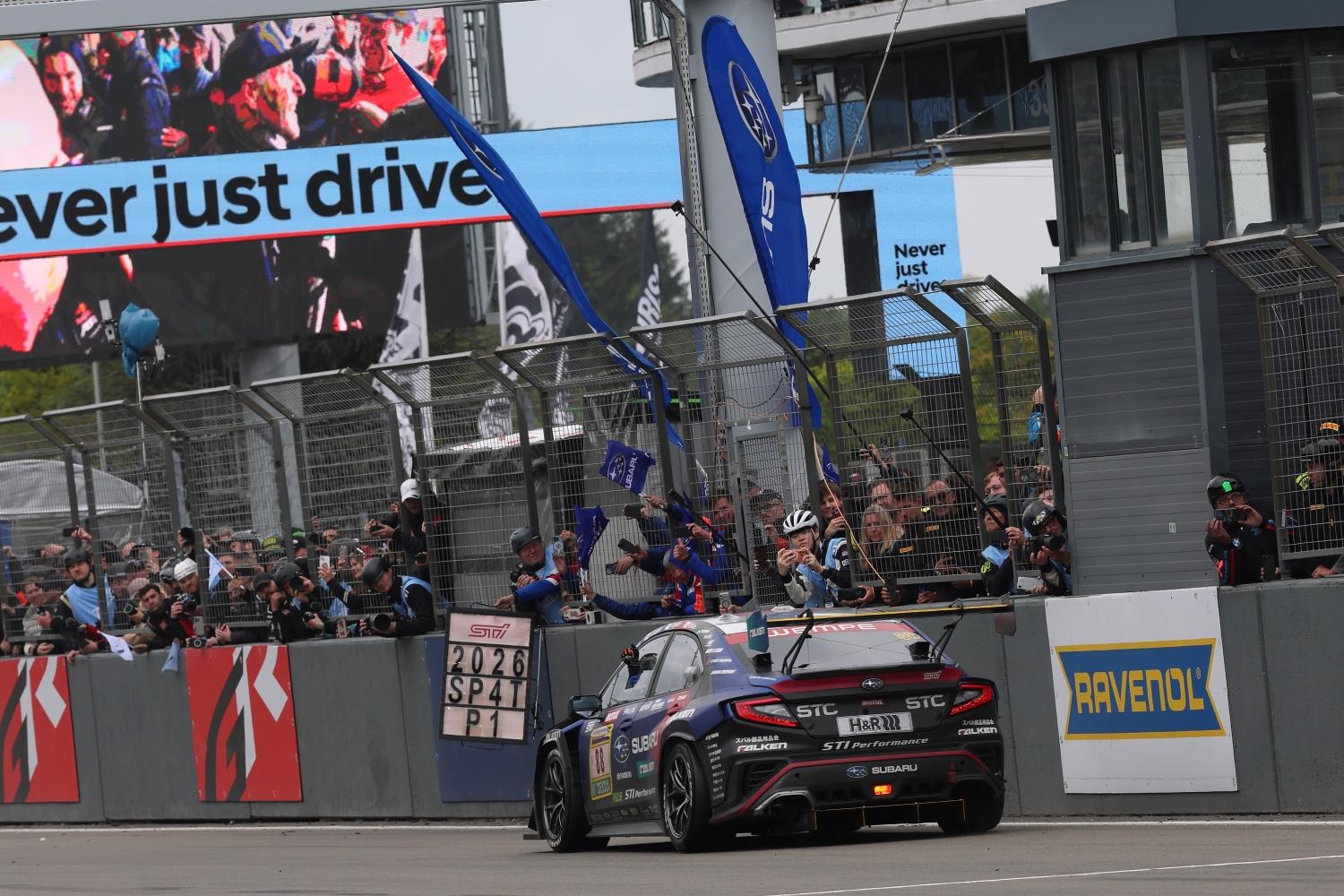 Subaru Tecnica International Inc. (STI), Subaru’s motorsport subsidiary, competed in the 54th Nürburgring 24-Hour Race, held at the Nürburgring circuit in Germany from 14-17 May 2026, with the “SUBARU WRX NBR CHALLENGE 2026” based on the WRX S4 The team successfully completed the full 24-hour race and achieved their goal of winning the SP4T* class.* SUBARU WRX NBR CHALLENGE 2026 (Drivers: Carlo van Dam, Kota Sasaki, Takuto Iguchi, and Rintaro Kubo) successfully advanced through official qualifying, finishing 68th overall out of 159 entries and 2nd in the SP4T class. In the final race, the SUBARU WRX chased down the class pole-sitter, overtook it early in the opening stages, and steadily extended their lead. They then continued to improve their overall position while competing against higher-class cars, ultimately crossing the finish line in 31st place overall on the final day of the race. The SUBARU WRX completed a total of 139 laps, covering approximately 3,527.5 km over the 24 hours. This result marks SUBARU/STI’s second victory in the SP4T class since 2024. *SP4T class…Class for turbocharged cars between 2.0L and 2.6L
 -
Dorset Sportscars (ex Subaru dealership and specialist repairer) Based in Three Legged Cross in Dorset
-
It's about time we revisited the list of Subaru specialist garages and repairers. PLEASE add to this list with who you would recommend as being honest, reliable and knows what they're doing with these specialist cars. Since Pro-Drive dropped off the scene for a while and dealerships closed there must be quite a few repairers around so if you can drop your recommendations in this thread we can work on collating 'the definitive list' Thanks
-
please keep us updated on your progress it will be interesting to see where this goes
-
-
I would take it to a transmission specialist for second opinion as it could be a simple issue
-
Feel free to drop an advert with pics in the For Sale section of the forums
-
well done, sounds like you are sorting the issues one at a time and working your way through the car - by far the best way to know the car and get it up together over time
-
it may be worth getting a second opinion because unless they know specifically which component is likely to have failed then it may be a simple issue
-
-
Sounds like a good car - hopefully you should have a quick sale
-
Hope you manage to source one - seems subframes are a massive issue on many makes of vehicles nowadays and chronic shortages worldwide at the mo, I guess they thought it would never have been an issue - last subframe I changed was on an old school Mini - rear one as the front ones didn't rust as the engine leaked oil over the subframe so wasn't an issue :-)
-
If its a heavy clutch then it may be misaligned or clamped down unevenly when fitted. I would go over to the next one you see in a car park, etc and ask if you can try their clutch to see how it differs
-
Hopefully someone on here maybe able to assist you soon?
-
Try these companies: https://carwindowregs.co.uk/ https://www.windowregulatorman.co.uk
-
To be fair, I do wonder about tightening certain fasteners with torque wrenches as you cannot (without crack testing) evaluate the condition of the fasteners and the parts being clamped. When I started out in the motor trade over 45 years ago, the only time we used a torque wrench was for cylinder head bolts, hub nuts and wheel nuts. The rest of the time it was usually tightened to FT and you can almost feel the yield point of the tightened nut or bolt. Caught a cold many years back when torquing up bolts only to find they sheared....can you guarantee the condition of the components, how the wrench is used correctly and is it calibrated accurately. Also, the common problem is that if a NutGun has been used to tighten fasteners in the past then this can also stretch the bolts rendering them unusable. In answer to your question, I would tighten them by hand (never use NutGuns as I see so many doing nowadays) and I would add a thin smear of nut or thread lock to ensure it doesn't work loose even if it is slightly under tightened. If you're using the correct wrenches, sockets, ratchet or breaker bar you will know when it is tight and seated correctly without killing it with brute force
-
Not personally but we will be shortly publishing a list of Subaru garages for Premium Members within the next few weeks
-
Crikey thats a mess - one way I have sorted issues like this before is to remove every wire that is non-original so that it goes back to standard and then you can work forwards from there Worth taking some notes and photos of where the wiring goes in case you want to put it back how it was
-
Bargain car for the money
-
I would keep pushing for it and especially if there is any hint of safety related issues resulting from the defective component
-
Have you a price in mind? any more details on the car?
-
I would use eBay as my starting point - get most of my spares and parts from there