Do Not Sell My Personal Information Jump to content
View in the app

A better way to browse. Learn more.

Subaru Owners Club UK | Subaru Forums

A full-screen app on your home screen with push notifications, badges and more.

To install this app on iOS and iPadOS
  1. Tap the Share icon in Safari
  2. Scroll the menu and tap Add to Home Screen.
  3. Tap Add in the top-right corner.
To install this app on Android
  1. Tap the 3-dot menu (⋮) in the top-right corner of the browser.
  2. Tap Add to Home screen or Install app.
  3. Confirm by tapping Install.

Featured Replies

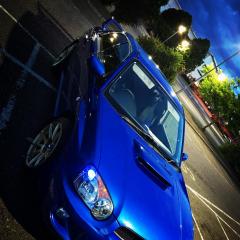
Hey! Just bought myself a nice Scooby! WRX, 300bhp, stage2 with lots of mods! Just thought i'd meet fellow Suabru owners/get ideas!

Only things iv done to her so far is side lights..healthcheck..mudflap stickers.. small things make big difference ;) 

IMG_8978.jpg

5368A2CD-B425-45EE-B002-4E64DE40C543.jpg

IMG_9030.jpg

IMG_9248.jpg

car2.jpg

car1.jpg


  • Author

Follow me on Instagram! - jenkinos 

Welcome, Looks lovely!

Wanna sell the wheels lol


Welcome nice looking wrx you got there! What performance mods you got hiding in your bay? :)

  • Author

Thanks for the welcome 😝 unfortunatly the wheels wont be for sale as i love them too much..

will lay out the spec soon when i get the time 👌

IMG_8862.JPG

I really like 02c blobeyes too 😉

Not a fan of fog lights on the blobeye, but nice wheels!


Welcome, shes a beaut!

Create an account or sign in to comment


Background Picker
Customize Layout

Configure browser push notifications

Chrome (Android)
  1. Tap the lock icon next to the address bar.
  2. Tap Permissions → Notifications.
  3. Adjust your preference.
Chrome (Desktop)
  1. Click the padlock icon in the address bar.
  2. Select Site settings.
  3. Find Notifications and adjust your preference.