Do Not Sell My Personal Information Jump to content
View in the app

A better way to browse. Learn more.

Subaru Owners Club UK | Subaru Forums

A full-screen app on your home screen with push notifications, badges and more.

To install this app on iOS and iPadOS
  1. Tap the Share icon in Safari
  2. Scroll the menu and tap Add to Home Screen.
  3. Tap Add in the top-right corner.
To install this app on Android
  1. Tap the 3-dot menu (⋮) in the top-right corner of the browser.
  2. Tap Add to Home screen or Install app.
  3. Confirm by tapping Install.

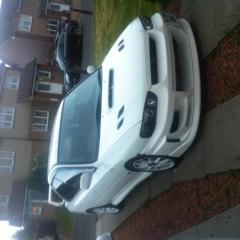
Blobeye chargespeed bumper on a classic

Featured Replies

Hi .I modified a blobeye chargespeed bumper to fit my classic. What do you think?

image.jpg

image.jpg


Looks a good fit you've done well 

Seen a few blob bumpers on classics looks good 


  • Author

Thanks for the feedback everyone. Also thinking about modding a set of classic Tommy Kaira arches to widen it out,putting wider side skirts and putting the chargespeed rear bumper on with the carbon diffuser. Here's the front one to give an idea how it will look. 

image.jpg

  • Author

Thanks. I will probably make a mould then work with copies of them because if I mess up or they get damaged. I will probably never find another set. They're off a coupe so I have to split the back ones or stick them on as is and make my passengers climb in through the front.

Nic! 😉

Sent from my HTC One_M8 using Tapatalk


Nice job there matey! Sweat of the forehead, effort of the hands and bobs your uncle!😉👍👌

Create an account or sign in to comment


Background Picker
Customize Layout

Account

Navigation

Search

Configure browser push notifications

Chrome (Android)
  1. Tap the lock icon next to the address bar.
  2. Tap Permissions → Notifications.
  3. Adjust your preference.
Chrome (Desktop)
  1. Click the padlock icon in the address bar.
  2. Select Site settings.
  3. Find Notifications and adjust your preference.